- Published on
Does AI Actually Make Your Development Team Faster?
Before I get into any of this, you should know where I stand: I'm a huge AI bull. I don't think there's a career or a company that isn't being impacted in one way, shape, or form by artificial intelligence. So this isn't going to be a cautious list of dos and don'ts. It's what I've actually watched happen on a real team using these tools every day, and what I think you should expect if your team starts doing the same.
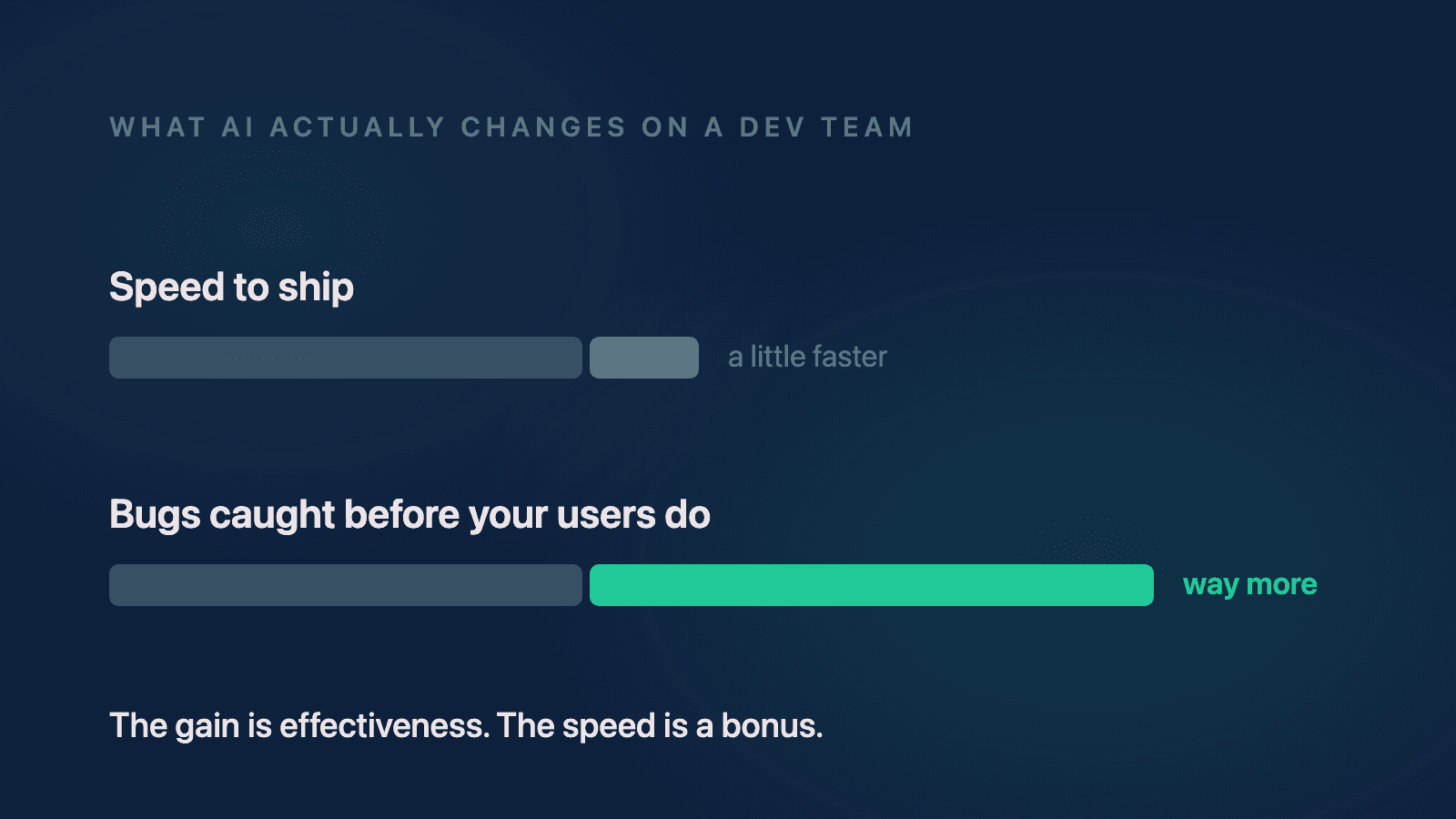
Here's the short answer to the title question: not really, or at least not in the way most people mean it. AI won't compress your whole delivery timeline the way the demos suggest. What it will do is make your team more effective: more bugs caught, more scenarios tested, better context on every ticket, and higher code quality than you had before. The speed gains are real but smaller than advertised, because everything still runs through human judgment, and it should.
Mark Zuckerberg made a version of this point in Meta's AI manifesto, The Future Is for Everyone: "Invention, not automation, will be the greatest contribution of superintelligence." I was reading that recently and I don't think I've ever agreed with a statement more, because the more I work with these tools, the more I see it's true. AI is much better at helping you build new things than at making your existing process cheaper.
Let me walk through what that looked like on an actual project.
What happened when a real team went all-in on AI?
Recently I've been working on a brand new app for a client, and they wanted us to use AI throughout the everyday work. Because it's a brand new app, with new styling, new features, new processes, new everything, there was no legacy code fighting us. Almost everything we touched was greenfield.
And on greenfield work, AI genuinely flies. The client originally wanted a release in September. Then they asked whether we could get a beta out in June with the real release still in September. I remember thinking we could probably knock out most of it by June. We got every single main feature out to beta testers in June. The remaining months are now going to features that were originally scoped for "someday," which we've been able to start early.
That's the invention side of the equation, and it's real. New things get built noticeably faster.
But something else happened at the same time, and this is the part most people don't talk about.
Why did our bug count go up?
Because we were moving so much faster, the team started getting more tickets returned to them. I call them kickbacks: a story or bug that comes back from QA instead of closing.
I compared this team against a previous app where they weren't using AI. On that project, the team saw maybe 4 to 5 kickbacks per two-week sprint, and some of those would spill into the next sprint. On the new AI-heavy project, the same team is seeing anywhere between 10 and 20 kickbacks per sprint. But they're also closing them faster than they ever closed the smaller number.
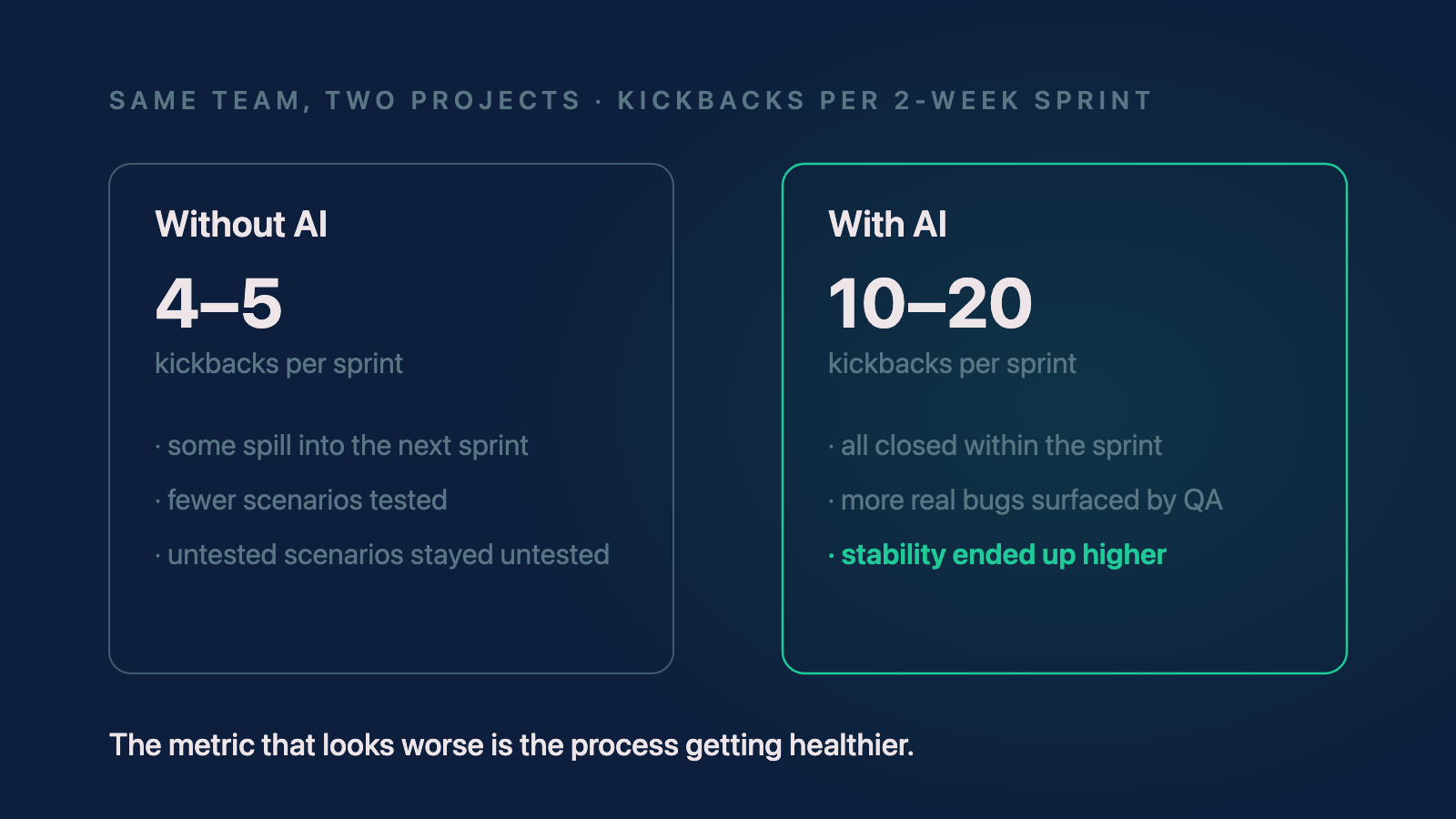 The same team, two projects. More kickbacks sounds worse until you look at what the kickbacks were and where the stability ended up.
So which is better, 5 kickbacks or 20? Honestly, I think it's subjective. It depends on the team and the director and what they decide actually matters. For this team, the answer was that more kickbacks were better, because most of them were real issues found by testing scenarios that simply weren't being tested before. The bug count went up because the finding went up, not because the code got worse. Code quality and stability on this project ended up higher than the old project ever was.
That's the pattern I keep seeing with AI on development teams: the metric that looks worse is often the process getting healthier. If you're a founder looking at a dashboard, you need to know which one you're looking at.
What can your QA team do with AI?
The QA side of this same team is, to me, the most interesting part of the story.
They had an initiative to lean into automated testing, something they hadn't been doing well. Using tools like Claude and Copilot, they built out their automation suite significantly faster than they'd managed before. Whenever they got stuck, the AI got them across the finish line.
Then they took it a step further, and this is the practice I'd recommend to almost any team. When they found a bug, they'd have the AI investigate it before handing it to a developer. Say a ticket asked for a color change from black to purple on one screen, and the change showed up on ten screens. The QA agent would look at the code, come back with "this looks like a shared global stylesheet, the change was probably applied at the wrong level," and document that as a comment on the ticket.
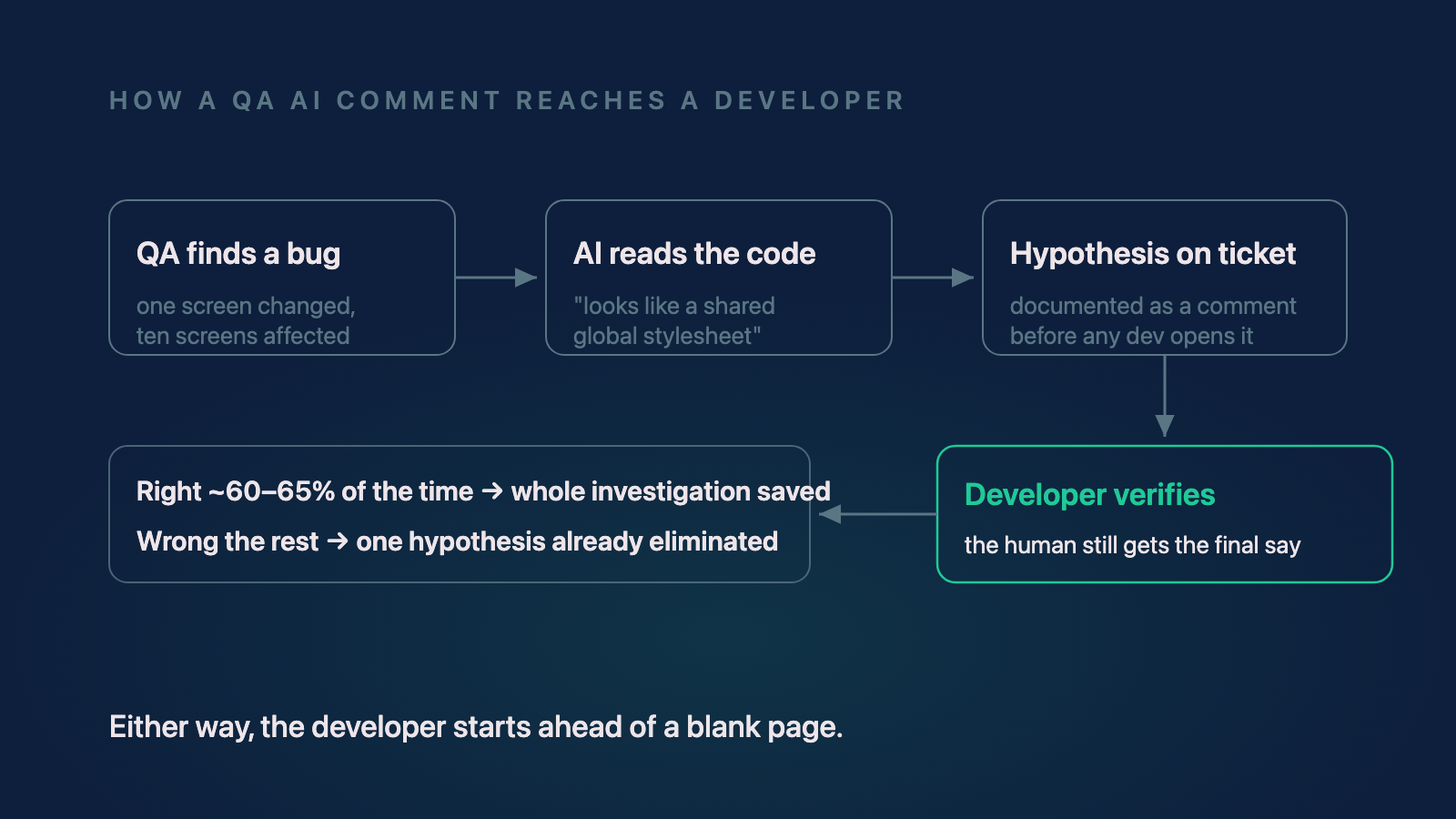 The QA AI never gets the final say. It attaches a hypothesis; the developer confirms or rejects it. Either way the developer starts ahead.
Now the developer opens the ticket with a working theory already attached. I worked inside this loop myself, and my experience was that the AI's comment was right maybe 60 to 65% of the time. Sometimes I could look at it and know immediately it was wrong, and exactly why, because I know mobile. Other times it was dead on and saved me the whole investigation.
A lot of people would look at 60 to 65% and say that's way off, that's a coin flip with extra steps. I look at it differently. It's right more than half the time, and even when it's wrong, that's one hypothesis eliminated before I've spent a minute on it. That's why this team could absorb 20 kickbacks in a sprint and still close them all: every ticket arrived with context instead of a blank page.
They used the same approach for regression hunting. When something broke during regression testing, they'd have the AI walk the sprint's pull requests and identify which one likely introduced the break. They could do that manually before; now it's faster, because the agent can actually read the code across every PR and narrow it down before a developer gives the final say.
Notice the shape of all of this, though. There are two sign-offs in the loop: QA has a say, and the developers still have a say. AI didn't remove either one. That's exactly why the efficiency gain is smaller than people expect, and exactly why the quality gain is real. I've written before about running an agentic review before code ever merges, and it's the same principle: the AI widens what gets checked, humans still decide.
What about product managers and product owners?
One of the things I've really enjoyed is watching the product side pick these tools up, because it keeps momentum going across the whole team, not just engineering.
 Photo by Nghungdo, CC BY-SA 4.0, via Wikimedia Commons.

The PMs and POs on this team started using AI to pull metrics about how work was actually flowing. I did it for myself too: how many kickbacks did I get this sprint? How does that compare to the rest of the team? We could go deeper: one ticket had been returned over ten times, so we asked why. Why didn't we catch it the first time? What took ten iterations? The AI gave us a detailed log of what happened, and we learned from it and moved on.
That kind of visibility used to be a reporting project someone had to own. Now it's a question you ask. I've written a full post about building a ticket-quality agent for PMs and POs if you want the deeper version of that story.
So where does that leave the efficiency question?
Here's my honest read. The team is seeing small efficiency gains inside individual features, and those gains will grow as the team fine-tunes its skills and agents. But the big leap most people imagine, where the whole delivery timeline collapses, isn't showing up, and I don't think it will any time soon. The human checkpoints that survive, QA's say and the developer's say, are the same checkpoints protecting your product.
So the honest framing is: AI made this team more effective at roughly the same speed, and modestly faster on top. If you go in expecting effectiveness with slow-building efficiency, AI is a superpower for your company. If you go in expecting to simply move fast, you're going to be disappointed, or worse, you're going to ship the disappointment to your users.
Because here's what happens when people take the speed and skip the process. You crank out features fast, fast, fast, and nobody double-checks whether any of it is validated and working for real users. You can see the results live on the App Store right now: Apple is on pace to add over a million new apps this year, most of them low-quality AI-generated apps, while downloads have grown just 2 to 3% a year. The supply of apps exploded; the supply of apps people actually want didn't. "AI slop" is the phrase getting thrown around, and it's noticeable. I've spent enough time rescuing vibe-coded apps to tell you the pattern from the inside: the coding was the fast part, and everything that makes software trustworthy was skipped.
The fix isn't to slow the AI down. It's to spend the time you saved. If a feature used to take you a month and now takes a day, nothing says you have to release it in a week. Take the rest of that month and test it, double-check it, make sure it actually works. The efficiency gain is still there; you're just spending it on quality instead of on the calendar. That's the discipline we hold on every build we take on, with or without AI in the loop.
These are working thoughts from one team's experience, and there's a lot of subjectivity in some of it. There's no universal right answer on whether 20 well-understood kickbacks beat 5 mysterious ones; that depends on your team and your priorities. But if you're deciding whether to let your developers, your QA team, and your product people use AI, my answer is yes, all of them, as long as everyone understands what they're actually getting: a better product, not a shorter timeline. I think that's more true than not.
Need help with your project?
Chris Martinez
Founder of CAM Software · Mobile engineer
Chris founded CAM Software in 2022. He leads embedded product engineering engagements for established companies with mobile-led products, inherited applications, and delivery challenges. His work spans product alignment, React Native and native mobile engineering, supporting web and backend systems, release reliability, and responsible AI delivery. He also operates software products owned and operated by CAM Software from Northwest Arkansas and works with teams nationwide.