- Published on
How to Onboard TestFlight Beta Testers
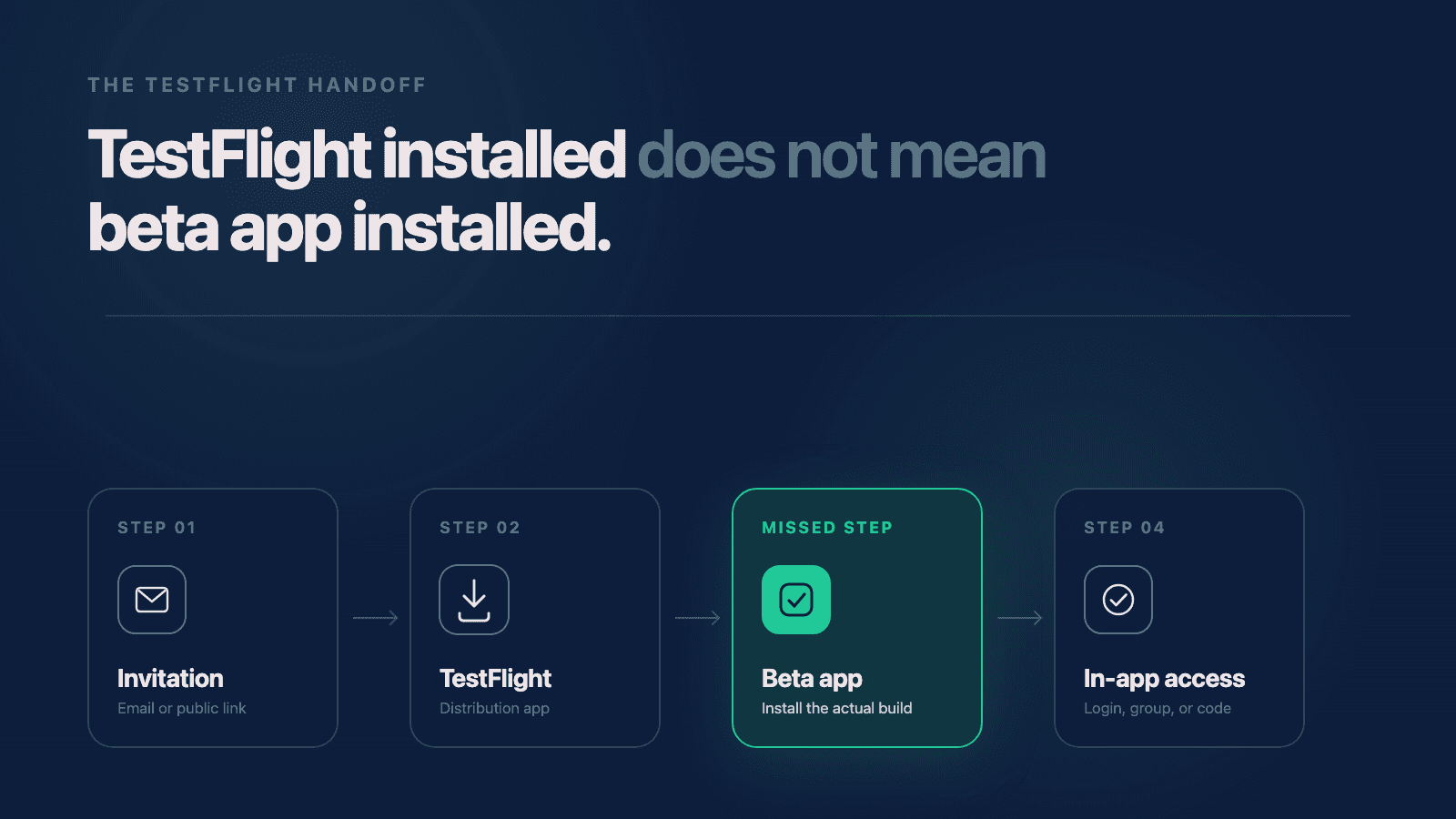
I recently started beta testing an iOS app and asked a few people to help me get some quick feedback. The setup seemed simple: I would invite them through TestFlight, they would install the app, and then I would send them a separate link or code to join a group inside the app.
The first person messaged me and said they were ready for the code. I sent the link, but they told me it did not work. I sent the code instead, and they said that did not work either. They could not even paste it where they were trying to use it.
That sounded like an app problem, so I started treating it like one.
We found a small backend issue and fixed it. The link still did not work for them. I started wondering whether another change needed to go into a new build. Then Claude suggested something that sounded strange at first: maybe the tester had not actually installed the app.
They had already told me they downloaded it. Why would I question that?
I checked App Store Connect and saw that the person had been invited, but it did not show that they had installed the build. I asked for a screenshot of their phone. That screenshot made the whole situation clear.
They had installed TestFlight. They had not installed my app.
Why couldn't the tester see the beta app?
TestFlight and your beta app are two separate installs. TestFlight is the Apple app that distributes beta builds. Installing it prepares the device for testing, but the tester still has to accept your invitation and install your specific app.
Apple describes the same sequence in its TestFlight overview: testers install TestFlight, use an invitation email or public link to accept the invitation, and then install the beta app.
In this case, the tester completed the first step and reasonably believed they were done. They saw TestFlight on their phone and thought that was the app I had asked them to download. The separate link and code I sent were meant to be used inside my app, so of course they did not work in TestFlight.
Once I resent the beta invitation, they installed the actual app. I sent the in-app link again, and everything worked the way we expected it to work the first time.
Why did this look like a code problem?
The confusing part is that we found a real backend issue while investigating. Fixing it made me think we had found the reason the tester was blocked.
But a real bug is not necessarily the bug a person is experiencing.
I could have kept changing code and sending builds without solving this person's problem, because they had never reached the app. The most useful clue was not in the codebase. It was the gap between what I meant by "download the app" and what the tester understood those words to mean.
That is one reason beta testing matters for a new app build. It is part of preparing an app for App Store submission, but it does more than uncover crashes and broken features. It shows you where instructions, handoffs, and assumptions break down before a larger group of users encounters them.
What should TestFlight instructions tell beta testers?
I think the instructions need to describe every handoff, even the ones that feel obvious to the person running the beta.
For an email invitation or public-link flow, I would now give testers a checklist like this:
- Open the TestFlight invitation on the iPhone or iPad you will use for testing.
- Install Apple's TestFlight app if your device does not already have it.
- Continue through the original invitation. If installing TestFlight interrupted the process, reopen the invitation and try again.
- Confirm that you can see the beta app's name and icon inside TestFlight.
- Tap Install for the beta app.
- Confirm that the beta app now has its own icon on your device, separate from TestFlight.
- Open the beta app before trying any login, group invitation, or feature-specific instructions.
Apple supports inviting external testers through either email or a public link, so the exact screens can vary depending on how you distribute the beta. The important part is the same: the invitation has to lead all the way to the beta build, not stop after TestFlight is installed. Apple's current external-testing instructions explain both invitation methods.
I would also include one sentence that says exactly what success looks like: "When you are finished, you should see both TestFlight and the beta app as separate apps on your phone."
That sentence probably would have prevented this entire situation.
What can App Store Connect tell you?
App Store Connect gives you a useful way to check which part of the invitation flow a tester reached. Apple's tester information reference separates the process into three statuses:
Invitedmeans the invitation was sent.Acceptedmeans the person accepted the invitation.Installedmeans the beta build was downloaded.

A real App Store Connect view shows the difference between sending an invitation and installing the beta build.
Those statuses give you a much better first question than "Does the app work?"
If the tester is still marked as invited, ask whether they opened and accepted the invitation. If they accepted but did not install, ask whether they can see the beta app inside TestFlight. If App Store Connect says installed, then it makes more sense to move into device details, screenshots, login state, logs, and the app itself.
I would not use the status to tell a tester they are wrong. I would use it to ask a more specific question. In my case, saying "I can see the invitation, but I cannot see an installation" led to the screenshot that solved the problem.
Ask what the tester sees before fixing what you assume
The question I should have asked earlier was not "What error are you getting?" It was "What app are you looking at right now?"
Screenshots help because people use the same words for different things. "The app" might mean TestFlight, your beta build, the App Store, an invitation page in Safari, or a screen inside the product. "The link does not work" might mean it did not open, it opened the wrong place, or it opened correctly but the next step was not obvious.
Before changing code, I now want to know:
- What icon did the tester tap?
- What screen is currently open?
- What happened immediately before the problem?
- What does App Store Connect say about their status?
- Can they send a screenshot or short screen recording?
These are simple questions, but they narrow the problem much faster than guessing.
Beta onboarding is part of the user experience
Some beta testers will already know TestFlight well. They will accept the invitation, install the build, and start testing without asking a question.
Others may be seeing TestFlight for the first time. That does not make them bad testers. Depending on who the app is for, they may be closer to your real users than the people who know every step already.
If the beta is confusing before someone even opens the product, that is useful feedback. It tells you the process was designed around what the team knows rather than what the tester sees.
This also goes beyond TestFlight. The same mistake can appear in account onboarding, subscriptions, in-app purchases, permissions, and any other flow where one step depends on another. When a user gets stuck, the problem is not always a broken feature. Sometimes the missing piece is a sentence nobody thought they needed to write.
Document the lesson before the next beta
After we figured this out, I added the missing steps to the process I use when preparing beta instructions. The next time I invite testers, the instructions will explicitly separate installing TestFlight from installing the beta app.
None of this was a big deal in the end. The tester got into the app, the link worked, and we moved on. But it made me recognize how easily I could have kept debugging the wrong thing.
If I am asking someone to help test my app, I think it is on me to make every step as clear as I can. The more I set testers up for success, the better feedback I am going to get, and the better chance they will still want to use the app when it actually launches.
Need help with your project?
Chris Martinez
Founder of CAM Software · Mobile engineer
Chris founded CAM Software in 2022. He leads embedded product engineering engagements for established companies with mobile-led products, inherited applications, and delivery challenges. His work spans product alignment, React Native and native mobile engineering, supporting web and backend systems, release reliability, and responsible AI delivery. He also operates software products owned and operated by CAM Software from Northwest Arkansas and works with teams nationwide.